We all like to update and upgrade ourselves. Technology is something which gets updated or upgraded rapidly.
Every weak , Every month we get new features and new advantages.
Now talking about new features, we shall talk about the upcoming Android system.
Android 11 is all set for the global launch .
Let’s talk about the features and changes of Android 11.
As per the alphabetical order this time Google has named it’s Android system EASTER EGG.
Updated Android system provide us lot of features:
1. Dark mode scheduling : This is the most loved feature right now. But when we enable the dark mode the device gets into dark mode until we disable it.. Many people don’t like this and want their devices into dark mode for specific time. This update may help you to schedule when your device may get into dark mode and when it would disable on its own.
2. New App icon shape : In this feature you have option to choose in what shape you want to see your app icons. You may change it whenever you want.
3. Notifications : This feature provide you the identical notification of every app. After every app notification it draws a dividing line between another app notification. Which helps users to notice different app notification.
4. Media settings : This feature provides us to Swap 5 different Media apps. Like Spotify, Music App, youtube, etc. You may enable this in quick settings.
These were the basic features and changes in the upcoming Android system.
Other features are:
1. Improved do not disturb (DND)
2. Resizable pip videos
3. Notification history
4. Pin apps in share menu
5. Airplane mode will not disable bluetooth
6. Around 100 new emojis.
7. Improved app permissions
8. Revamped power menu .
9. Cat controls .
These are some of the exciting new features but we may see many more features and changes .
Right now we can see the beta version of this Android 11.
It’s just a month away for it’s global launch.
Right now the beta version support’s devices like:
This pandemic has taught us the use of many technology. This pandemic has also made us believe in technology .
Right from cutting hair, taking online lectures, organizing webinars,etc.
The most used technology in this pandemic are PC’s, laptops. PC play’s a huge role in organizing webinars and taking online lectures and many more.
If you are thinking about buying one this might be useful for you. Initially decide what kind of PC you want..If you don’t have idea about this,don’t worry I have already written about this.
Click on the link to know what you should look in a PC.
Talktime , balance, recharge are some of the words we are really obsessed with. Everytime we call a person we always look for sufficient balance or recharge in our phones.
Sometimes we don’t remember the recharge date and then try to call someone . That is when we get know about insufficient balance in our cellular device.
Having insufficient balance may have various advantages but not more than disadvantages.
But what if i tell you , You can callanyone with insufficient balance in your device
Yes, we can do that. Some of you must be thinking of Whatsapp call, GOOGLE duo, Zoom calls, etc.. No, These are the apps which provide us facility to call through internet . But , what if we can make a normal callthrough wifi.
We are living in 21st century where everyminute we come across new problems , ideas , and new solutions . This is where wifi calling is introduced.
Wifi is the most underrated term . Many people are not aware of other features of wifi apart from using it as internet provider.
Wifi calling is also known as vowifi.
By using this feature we may save our data ,eventually money. Right now not all mobile phone have this feature but by 2021 this feature will be available in all mobile phones.
Wifi calling may not be the only calling option but when compare to cellular calling, wifi calling is better option.
How to Enable this feature:
Steps to enable this feature
Step 1: Go to settings and type sim cards and network.
Step 2: After that you may see the information of your sim cards. Click on sim card 1 or 2.(.As per your choice)
Step 3; you can see many options were you can find wifi calling option. If u don’t have such option your phone may not support wifi calling.
Published by Akhil sonar
Step 4: Select wifi calling option and enable that option .
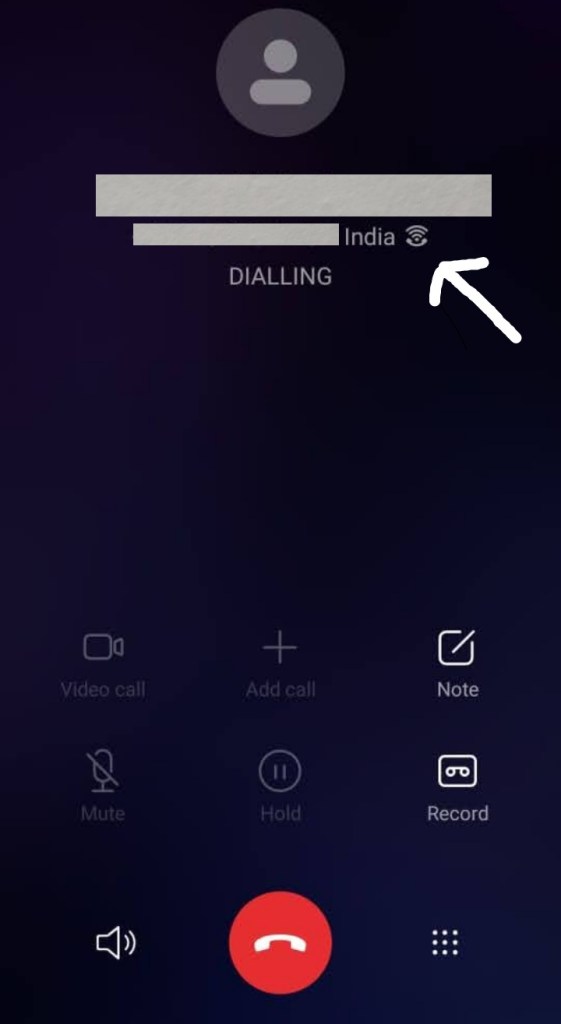
After following these steps you may get wifi calling icon on the notification bar. As shown in the image below.
Published by Akhil sonar
This is how you enable wifi calling option ..
To know whether this works or not, try calling someone and if the wifi calling icon which is shown on the notification bar is seen next to the number you dialed then wifi calling option is enabled.
If wifi calling icon is not shown next to the number you are calling , then your device does not support wifi calling.
Published by Akhil sonar
ADVANTAGES OF WIFI CALLING :
1. It does not require any additional charges from the service provider .
2. No need of buying new sim card or to change existing phone number.
3. This saves our regular calling data whenever connected to the wifi.
4. It does not interrupt your call even if the calling data is not sufficient.
5. This increases the quality of your calls .
Eg: voice quality remains same and does not buffer.
6. Whenever we move out from city to another we may skip the roaming charges if we our connected to wifi service.
Wifi calling is new feature and may not be compatible in the initially days and need more updates to use on a large scale.
As we discussed about the Advantages , let’s talk about Disadvantages .
Benefits and downside are two different sides of same coin. So though this feature provides benefits but also has some downsides.
DISADVANTAGES OF WIFI CALLING:
1. Wifi calling solely depends on the strength of the service you are connected with. So if the network falls the quality of calls may also decrease .
2. The feature is newly introduced in the tech world. So many devices in 2020 do not support this feature.
3. While using this feature , you may here voice of the other person with the delay of 1- 2 seconds .
4. Wifi calling isn’t the default feature, so we have to enable it as per our use.
5. Biggest downside may occur on the crowded places like , Railway stations, Malls , Airports , where many people are connected to the one service and use the service on a bigger size.
These were the most important downside of Wifi calling .
Now we all can make a call without having sufficient balance in our device.
Wifi calling may not be used at it’s fullest in rural areas where there is no wifi connections or the service provided.
FAQ’S
1. Who can use the feature?
•. Anyone whose device supports this feature .
2 . Does wifi calling cost any extra ?
•. Wifi calling uses your wifi service and does not cost any extra charges for calling.
3. How much data does wifi calling use?
•. Wifi voice calling uses around 1mb per minute .
4. Does it need fast wifi speed?
•. It is not mandatory to have a fast wifi network , but stronger the network better is the quality .
5. Is it possible to use to make an International call ?
•. Using wifi calling to make an international call can be used , but it also depends upon the service you have . It may have certain rules.
6. Does it charge more to make a domestic call ?
•. No , it does not charge more for domestic calls . Eg : to make a call in INDIA itself will not charge extra.
Many handset manufacturers name this feature differently. Manufacturers like Apple , samsung name it as vowifi. Some other manufacturers may name it as VOWLAN.
And now no need of making excuses about having insufficient balance to call someone.
The most important and only condition of this feature is..You must be connected to any wifi service.
Many devices now has been updated via software update . To enable this feature to its users .
This pandemic taught us to adopt new techniques and mode of communication, learning, work. Many of us are attending lectures through internet and various apps.
To attend such lectures and complete our goals at right time we need a device which should always be ready for our unexpected moves . There are many devices and PC’s which do not stand or perform as per our choice .
The main problems we face during such online classes and during work are : PC’s not working properly and their processor lagging behind..PC’s not able to open multiple apps and save their data . All such problems leads to delay in work submission and missing out some important points during lectures .
So now the question arises which PC should you get..?
In today’s competitive world many pc building companies offer us a great deal.. what does great deal mean? Great deal mainly depends upon our belief . If we are satisfied with the price of the PC then we may consider it a great deal . Some people may look for a great price with great features .
Looking on to current trends many buyers go for gaming PC’s . Such PC’s offers a great speed better storage and better processor .. while purchasing PC’s buyer should always look for alternate products and compare both products and then select one product which provides us great deal.
While looking for a PC..We should mainly look various factors such as brand name, brand reputation in the market and after sales service. After that a buyer should look for the technical aspects of the PC . Such as processor, screen ratio, features. After that buyer should look for the price.
Buyer should always consider at what price PC is offered and the features offered in the same price range . Always compare PC with other competing PC . All this gives an idea about How your PC should be. After considering all such factors , Now you know which PC you should get.










 INTROTALK